Guide Dynamic Experience (ExperienceTable.txt)
Well this guide is for configuring the dynamic experience file ExperienceTable.txt), which is easy to use but for some reason people get confused.
Step 1:
They must configure their server experience in GameServer-Common.dat. Including the VIP.
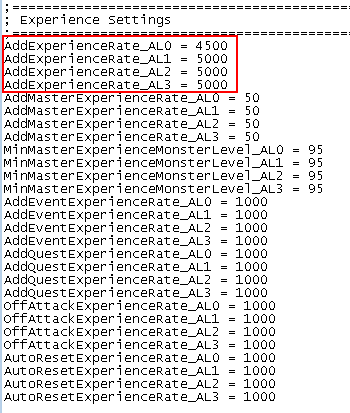
https://i.postimg.cc/XNtG74pn/screenshot-49.png
Step 2:
Open the ExperienceTable.txt file
The file is divided by these columns:
MinLevel: Minimum level at which it will be affected by dynamic experience.
MaxLevel: Maximum level at which it will be affected by dynamic experience.
MinMasterLevel: Minimum Master Level that will be affected by dynamic experience.
MaxMasterLevel: Maximum Master Level that will be affected by dynamic experience.
MinReset: Minimum reset in which it will be affected by the dynamic experience.
MaxReset: Maximum reset at which it will be affected by dynamic experience.
MinMasterReset: Minimum Master Reset in which it will be affected by the dynamic experience.
MaxMasterReset: Maximum Master Reset that will be affected by dynamic experience.
ExperienceRate: This is the part where everyone gets confused and it's because this column works with percentages.
Once you have configured the experience of your server in GameServer-Common.dat, you should know that this column is used to increase or decrease said experience, therefore, if you wanted the experience to be half of the server, only put 50, which would be 50%, or if you wanted If it was double, they would place 200, which is 200%, and if they wanted it to be the same as the server's, they would place 100, which is 100%.
Here is an example of how the server experience starts at 100%, then drops to 25%, half to 50%, and finally ends up with 1/4 of the original experience, that is 25%.

https://i.postimg.cc/5tSmdj37/screenshot-50.png


Comments
Post a Comment